Offline forms.
Operational apps. One platform.
Design a form, turn it into a full application, and automate the work around it, with or without signal. From HR to logistics to inventory, you never write a line of code.
Works offline on Android and iPhone · Excel in, Excel out · No developers needed
WHAT IT WORKS WITH
An App turns your forms into a business system.
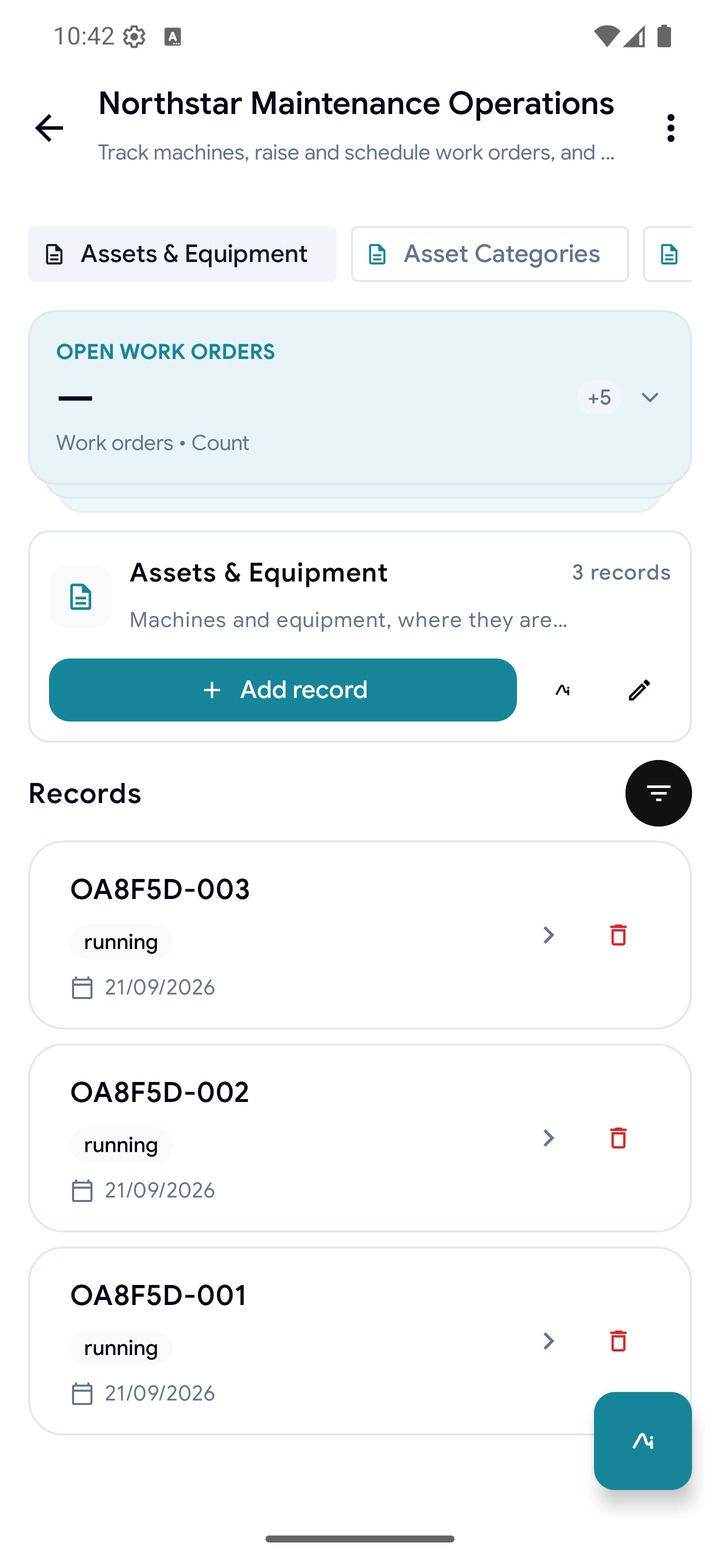
An App puts a form's data on real screens. Everything below is in the product today, ready for your team tomorrow morning.
Apps, not just tables
Each App has modules, records, statuses that move through a workflow, relationships between them, and a dashboard that works from the very first record.
 Work ordersAssetsPartsVendorsReports
 OA8F5D-001Pump 3In progressOA8F5D-002Conveyor AOpenOA8F5D-003Gearbox 2Done
 Asset IDReading (bar)
 Condition
 Photo
PhotoBuild a form by asking
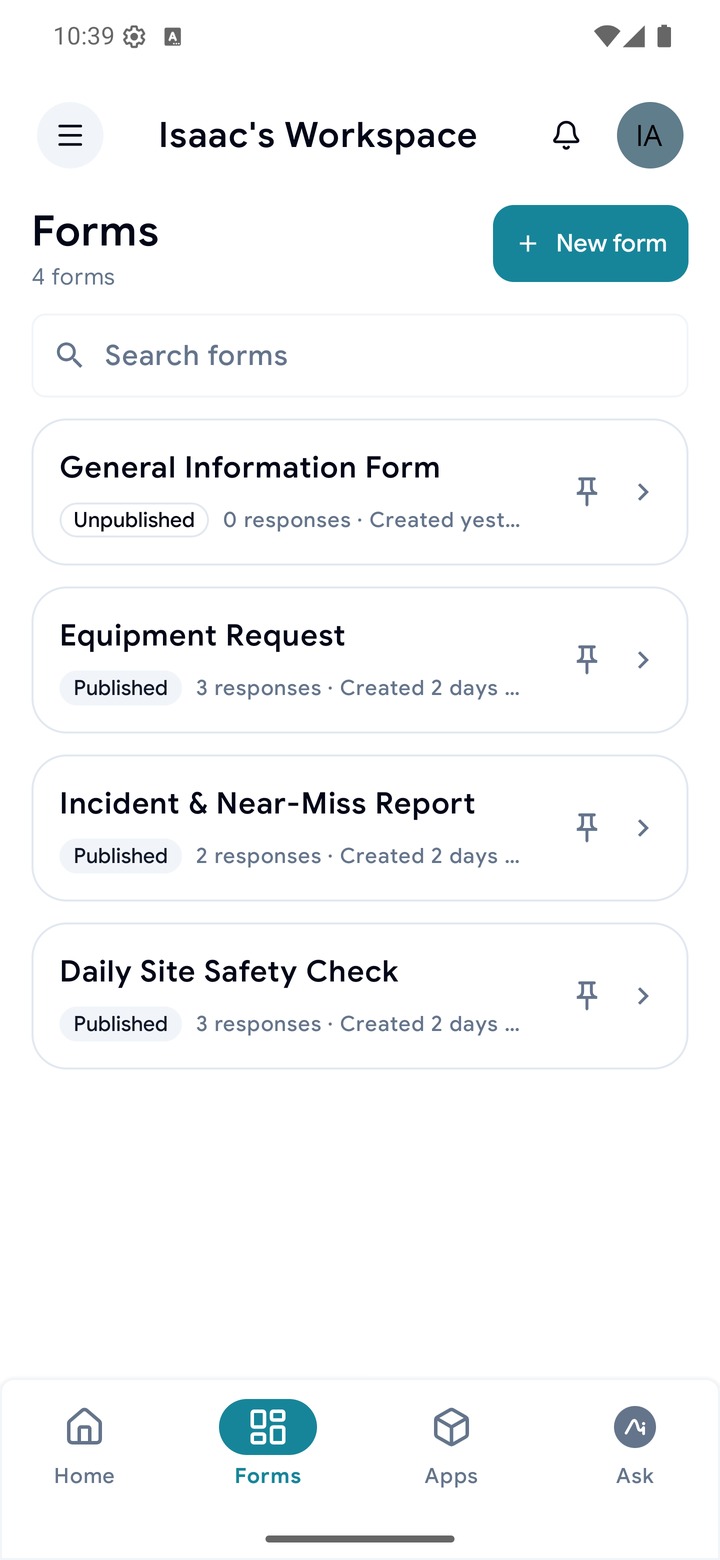
Say what to capture. The assistant drafts the form and you edit from there.
 Work ordersAssets
 Payroll
Permissions by department
Each App has groups with their own modules. What you can't open, you don't see.

 CUSTODY → R. OKOYE
 AST-0412 Pump 3R. OkoyeAST-0418 Conveyor AWarehouse 2AST-0431 Gearbox 2M. Idris
Assets, custody and trips
Keep a register of what you own, who holds each item, and when it changed hands. When a driver starts and ends a trip, the route is drawn on a map you host yourself.
'%3e%3cpath%20id='Vector'%20d='M8%20112C60%2070%2086%2074%20108%2082C150%2098%20210%2044%20312%2062C400%2078%20448%20110%20508%2082C548%2064%20572%2052%20592%2044'%20stroke='%2370B3C6'%20stroke-opacity='0.5'%20stroke-width='2'%20stroke-linecap='round'%20stroke-dasharray='2%2010'/%3e%3c/g%3e%3c/svg%3e)
'%3e%3cpath%20id='Vector'%20d='M312%2062C400%2078%20448%20110%20508%2082'%20stroke='%2370B3C6'%20stroke-width='2.5'%20stroke-linecap='round'/%3e%3c/g%3e%3c/svg%3e)
'%3e%3cpath%20id='Vector'%20d='M8%20112C60%2070%2086%2074%20108%2082C150%2098%20210%2044%20312%2062'%20stroke='%23095663'%20stroke-width='2.5'%20stroke-linecap='round'/%3e%3c/g%3e%3c/svg%3e)
'%3e%3ccircle%20cx='21'%20cy='15'%20r='10'%20fill='white'/%3e%3ccircle%20cx='21'%20cy='15'%20r='8.75'%20stroke='%230B6474'%20stroke-width='2.5'/%3e%3c/g%3e%3cg%20id='glyph'%3e%3cpath%20id='Vector'%20d='M17.6667%2015.2083L19.9583%2017.5L24.3333%2012.7083'%20stroke='%230B6474'%20stroke-width='0.875'%20stroke-linecap='round'%20stroke-linejoin='round'/%3e%3c/g%3e%3c/g%3e%3cdefs%3e%3cfilter%20id='filter0_ddd_0_80'%20x='0'%20y='0'%20width='42'%20height='42'%20filterUnits='userSpaceOnUse'%20color-interpolation-filters='sRGB'%3e%3cfeFlood%20flood-opacity='0'%20result='BackgroundImageFix'/%3e%3cfeColorMatrix%20in='SourceAlpha'%20type='matrix'%20values='0%200%200%200%200%200%200%200%200%200%200%200%200%200%200%200%200%200%20127%200'%20result='hardAlpha'/%3e%3cfeOffset%20dy='1'/%3e%3cfeGaussianBlur%20stdDeviation='1.5'/%3e%3cfeColorMatrix%20type='matrix'%20values='0%200%200%200%200.0588235%200%200%200%200%200.176471%200%200%200%200%200.2%200%200%200%200.05%200'/%3e%3cfeBlend%20mode='normal'%20in2='BackgroundImageFix'%20result='effect1_dropShadow_0_80'/%3e%3cfeColorMatrix%20in='SourceAlpha'%20type='matrix'%20values='0%200%200%200%200%200%200%200%200%200%200%200%200%200%200%200%200%200%20127%200'%20result='hardAlpha'/%3e%3cfeMorphology%20radius='1'%20operator='erode'%20in='SourceAlpha'%20result='effect2_dropShadow_0_80'/%3e%3cfeOffset%20dy='2'/%3e%3cfeGaussianBlur%20stdDeviation='3'/%3e%3cfeColorMatrix%20type='matrix'%20values='0%200%200%200%200.0588235%200%200%200%200%200.176471%200%200%200%200%200.2%200%200%200%200.05%200'/%3e%3cfeBlend%20mode='normal'%20in2='effect1_dropShadow_0_80'%20result='effect2_dropShadow_0_80'/%3e%3cfeColorMatrix%20in='SourceAlpha'%20type='matrix'%20values='0%200%200%200%200%200%200%200%200%200%200%200%200%200%200%200%200%200%20127%200'%20result='hardAlpha'/%3e%3cfeMorphology%20radius='3'%20operator='erode'%20in='SourceAlpha'%20result='effect3_dropShadow_0_80'/%3e%3cfeOffset%20dy='6'/%3e%3cfeGaussianBlur%20stdDeviation='7'/%3e%3cfeColorMatrix%20type='matrix'%20values='0%200%200%200%200.0588235%200%200%200%200%200.176471%200%200%200%200%200.2%200%200%200%200.06%200'/%3e%3cfeBlend%20mode='normal'%20in2='effect2_dropShadow_0_80'%20result='effect3_dropShadow_0_80'/%3e%3cfeBlend%20mode='normal'%20in='SourceGraphic'%20in2='effect3_dropShadow_0_80'%20result='shape'/%3e%3c/filter%3e%3c/defs%3e%3c/svg%3e)
'%3e%3ccircle%20cx='21'%20cy='15'%20r='10'%20fill='white'/%3e%3ccircle%20cx='21'%20cy='15'%20r='8.75'%20stroke='%23EB9A63'%20stroke-width='2.5'/%3e%3c/g%3e%3cg%20id='Frame'%20clip-path='url(%23clip0_0_75)'%3e%3cpath%20id='Vector'%20d='M18.9167%2017.5H23.2917C23.7889%2017.5%2024.2659%2017.3025%2024.6175%2016.9508C24.9691%2016.5992%2025.1667%2016.1223%2025.1667%2015.625C25.1667%2015.1277%2024.9691%2014.6508%2024.6175%2014.2992C24.2659%2013.9475%2023.7889%2013.75%2023.2917%2013.75C23.0628%2013.276%2022.6902%2012.8862%2022.2268%2012.6364C21.7635%2012.3866%2021.2331%2012.2894%2020.7113%2012.3586C20.1895%2012.4279%2019.7029%2012.6601%2019.3208%2013.0222C18.9387%2013.3842%2018.6806%2013.8577%2018.5833%2014.375C18.1689%2014.4192%2017.7891%2014.6262%2017.5273%2014.9505C17.2655%2015.2748%2017.1433%2015.6898%2017.1875%2016.1042C17.2317%2016.5186%2017.4387%2016.8984%2017.763%2017.1602C18.0873%2017.422%2018.5023%2017.5442%2018.9167%2017.5Z'%20fill='%230B6474'/%3e%3cg%20id='Vector_2'%3e%3cpath%20d='M17.25%2011.25L24.75%2018.75Z'%20fill='black'/%3e%3cpath%20d='M17.25%2011.25L24.75%2018.75'%20stroke='%23EB9A63'%20stroke-width='1.33333'%20stroke-linecap='round'/%3e%3c/g%3e%3c/g%3e%3c/g%3e%3cdefs%3e%3cfilter%20id='filter0_ddd_0_75'%20x='0'%20y='0'%20width='42'%20height='42'%20filterUnits='userSpaceOnUse'%20color-interpolation-filters='sRGB'%3e%3cfeFlood%20flood-opacity='0'%20result='BackgroundImageFix'/%3e%3cfeColorMatrix%20in='SourceAlpha'%20type='matrix'%20values='0%200%200%200%200%200%200%200%200%200%200%200%200%200%200%200%200%200%20127%200'%20result='hardAlpha'/%3e%3cfeOffset%20dy='1'/%3e%3cfeGaussianBlur%20stdDeviation='1.5'/%3e%3cfeColorMatrix%20type='matrix'%20values='0%200%200%200%200.0588235%200%200%200%200%200.176471%200%200%200%200%200.2%200%200%200%200.05%200'/%3e%3cfeBlend%20mode='normal'%20in2='BackgroundImageFix'%20result='effect1_dropShadow_0_75'/%3e%3cfeColorMatrix%20in='SourceAlpha'%20type='matrix'%20values='0%200%200%200%200%200%200%200%200%200%200%200%200%200%200%200%200%200%20127%200'%20result='hardAlpha'/%3e%3cfeMorphology%20radius='1'%20operator='erode'%20in='SourceAlpha'%20result='effect2_dropShadow_0_75'/%3e%3cfeOffset%20dy='2'/%3e%3cfeGaussianBlur%20stdDeviation='3'/%3e%3cfeColorMatrix%20type='matrix'%20values='0%200%200%200%200.0588235%200%200%200%200%200.176471%200%200%200%200%200.2%200%200%200%200.05%200'/%3e%3cfeBlend%20mode='normal'%20in2='effect1_dropShadow_0_75'%20result='effect2_dropShadow_0_75'/%3e%3cfeColorMatrix%20in='SourceAlpha'%20type='matrix'%20values='0%200%200%200%200%200%200%200%200%200%200%200%200%200%200%200%200%200%20127%200'%20result='hardAlpha'/%3e%3cfeMorphology%20radius='3'%20operator='erode'%20in='SourceAlpha'%20result='effect3_dropShadow_0_75'/%3e%3cfeOffset%20dy='6'/%3e%3cfeGaussianBlur%20stdDeviation='7'/%3e%3cfeColorMatrix%20type='matrix'%20values='0%200%200%200%200.0588235%200%200%200%200%200.176471%200%200%200%200%200.2%200%200%200%200.06%200'/%3e%3cfeBlend%20mode='normal'%20in2='effect2_dropShadow_0_75'%20result='effect3_dropShadow_0_75'/%3e%3cfeBlend%20mode='normal'%20in='SourceGraphic'%20in2='effect3_dropShadow_0_75'%20result='shape'/%3e%3c/filter%3e%3cclipPath%20id='clip0_0_75'%3e%3crect%20width='10'%20height='10'%20fill='white'%20transform='translate(16%2010)'/%3e%3c/clipPath%3e%3c/defs%3e%3c/svg%3e)

'/%3e%3cdefs%3e%3cradialGradient%20id='paint0_radial_0_84'%20cx='0'%20cy='0'%20r='1'%20gradientUnits='userSpaceOnUse'%20gradientTransform='translate(90%2090)%20scale(90)'%3e%3cstop%20stop-color='%23C2E0E8'%20stop-opacity='0.35'/%3e%3cstop%20offset='1'%20stop-color='%23C2E0E8'%20stop-opacity='0'/%3e%3c/radialGradient%3e%3c/defs%3e%3c/svg%3e)
Works with no signal
Forms fill and save on the device. Responses queue locally and sync on their own when the phone next finds a connection.
Statuses that stay current
Overdue, Low Stock and Expiring soon are worked out for you, so nobody maintains them and they can't drift.

 WO-1184

Automations on state change
When a record reaches a state, the App notifies the right people, in order, and logs every run.


Starts from your spreadsheet
Import an Excel file and it becomes a form with typed questions and its rows as records.


A public site from your data
Publish pages that list a module's live records and take submissions straight back into the App.
Pick one and start with something that already works.
Every module, relationship and dashboard tile is set up for you, and you can change any of it afterwards.
Start with the phone already in their pocket.
A scanning field is just one field on the form. You choose the device when you fill the form, not when you design it, so the same form works with a phone, an RFID sled, a wearable reader or a label printer.
'%3e%3cellipse%20cx='114'%20cy='38'%20rx='90'%20ry='14'%20fill='url(%23paint0_radial_0_125)'/%3e%3c/g%3e%3cdefs%3e%3cfilter%20id='filter0_f_0_125'%20x='0'%20y='0'%20width='228'%20height='76'%20filterUnits='userSpaceOnUse'%20color-interpolation-filters='sRGB'%3e%3cfeFlood%20flood-opacity='0'%20result='BackgroundImageFix'/%3e%3cfeBlend%20mode='normal'%20in='SourceGraphic'%20in2='BackgroundImageFix'%20result='shape'/%3e%3cfeGaussianBlur%20stdDeviation='12'%20result='effect1_foregroundBlur_0_125'/%3e%3c/filter%3e%3cradialGradient%20id='paint0_radial_0_125'%20cx='0'%20cy='0'%20r='1'%20gradientUnits='userSpaceOnUse'%20gradientTransform='translate(114%2038)%20scale(90%2014)'%3e%3cstop/%3e%3cstop%20offset='0.7'%20stop-opacity='0'/%3e%3cstop%20offset='1'%20stop-opacity='0'/%3e%3c/radialGradient%3e%3c/defs%3e%3c/svg%3e)
 BC 4006381333931
Phone camera
CAMERA · 1D/2D · QR
Scan barcodes and QR codes with any Android or iPhone your team already carries.
CSL CS108
Specifications ↗UHF RFID · 865–928 MHz
A UHF RFID sled reads a pallet or a shelf in one sweep.
Urovo R70
Specifications ↗UHF RFID + 1D/2D
A finger-worn RFID and barcode reader for when your hands are full.
SATO WS4
Specifications ↗4 IN · 203 / 300 DPI · USB · LAN · BT
Print QR codes, barcodes and labels straight from a form.
Things people ask us before they start.
If it isn't here, talk to us. We'll answer with your data in front of us.
Yes. Forms fill and save on the device, responses queue locally, and they sync on their own the next time the phone finds a connection.
No. Forms, modules, statuses and dashboards are all set up from the app itself, without code. Describe what you need to capture and the assistant drafts the form; you edit from there.
Yes. Import an Excel file and it becomes a form with typed questions and its rows as records. Export any module back out the same way.
Whoever you say. Departments are per-App groups granted specific modules. Access is resolved on the server on every request, and a module a person cannot open does not appear for them at all.
Usually nothing new. Barcodes and QR codes scan with the phone camera on any Android or iPhone your team already carries. For RFID, add a CSL CS108 sled to read a pallet in one sweep or a Urovo R70 finger reader for counting with your hands full, and a SATO WS4 label printer to print labels straight from the scan. All four work today.
Yes. Create an account and start building without paying anything, then upgrade from inside the app when your team needs more.
Build your first app this afternoon.
Start with a form, or the spreadsheet you already have. No developer and no card needed.
We'll set up your first App with you.